

Enterprise IT services / Automation operations
Enterprise Automation Operations
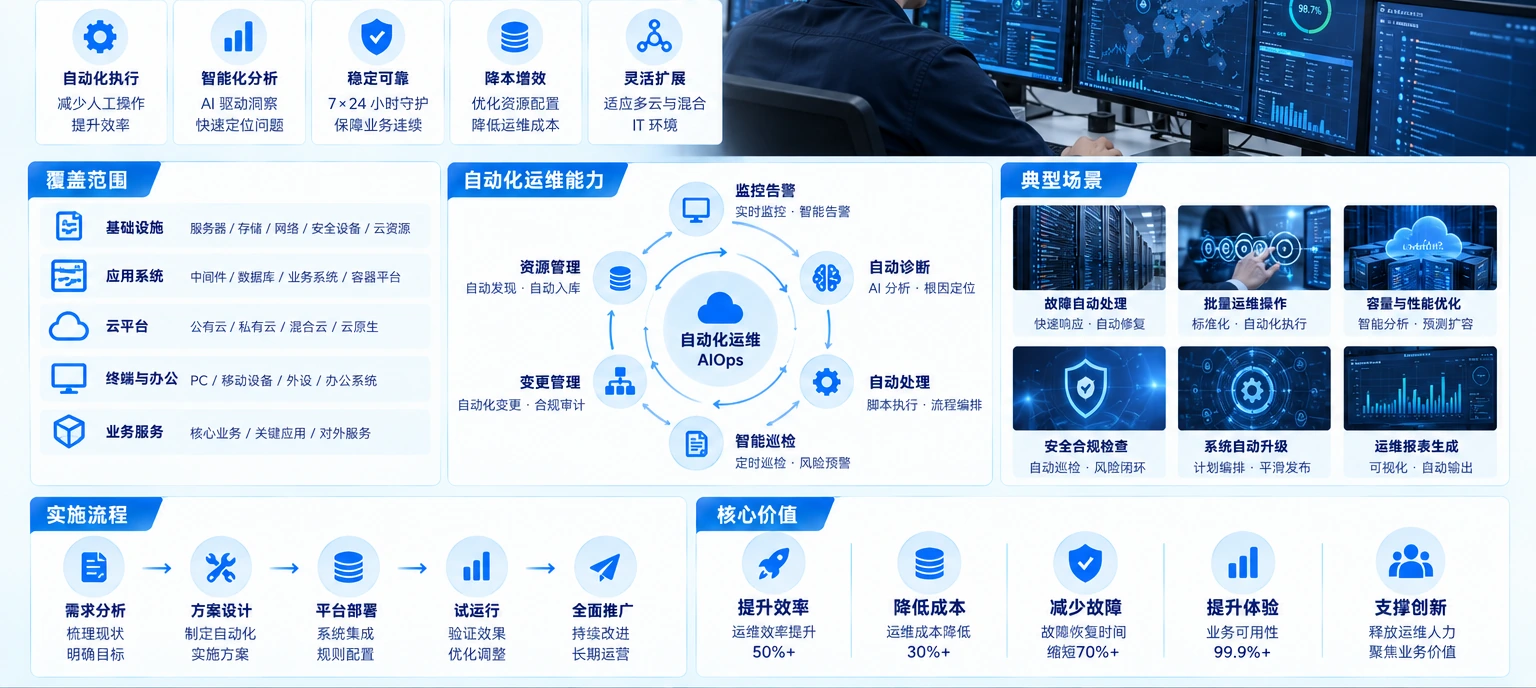
Manual checks can miss issues that cross devices and systems. Yuqi starts from the current environment and connects inventory, monitoring, alert routing, remote diagnosis and handover records into an operating workflow.
01Operating objective
See and handle changes in time
As devices and services grow, signals spread across platforms, logs and contacts. Automation makes changes collectable, judgeable and routable, while keeping the response available for review.
Yuqi first makes the real operating objects and ownership boundary clear, then decides what to collect automatically and what to execute under control.
- See changes earlierPut device state, service availability and key signals on an observable path.
- Find ownership fasterRoute events to the right contact or duty team by object, business impact and escalation rule.
- Review what happenedKeep alerts, diagnosis, changes, script results and configuration backups for the next decision.
02What Yuqi can coordinate
What Yuqi can do
Automation is not a standalone tool purchase. We work around the current devices, services and operating process, then deliver inventory, onboarding, rules, response, handover and optimization in stages.
Service and asset inventory
Map servers, network devices, storage, applications and dependencies into a clear object, state, owner and maintenance-window baseline.
Monitoring platform onboarding
Confirm observable objects, fields and integrations across the existing platform, agents, interfaces or log sources.
Metrics, thresholds and alerts
Set collection cadence, thresholds, suppression and escalation against business impact and the operating baseline.
Notification routing
Map alerts to contacts, duty teams and escalation paths, keeping a record of who receives, acts and confirms.
Remote diagnosis and maintenance
Within approved permissions and windows, run standard checks and controlled changes with results and rollback points.
Inspection reports, scripts and backups
Maintain reports, controlled scripts and configuration backups for review, change and continuous improvement.
Continuous optimization
Adjust rules, workflows and ownership from incident records, false-positive patterns, change results and operating feedback.
03Operating loop
Branch from one alert, execute in parallel and return to monitoring
An event passes the decision, permission and approval boundary before the central orchestrator. Tasks can run in parallel; results merge back into monitoring, while failures go to a human owner.
A monitoring alert enters the decision gate, confirms permission and approval boundaries, then reaches central orchestration. The work fans out to three scripts or batch tasks; results merge back to monitoring or move to a human owner.
Relationship diagram for illustration; it does not represent scripts running in a live backend. Interfaces, permissions, approvals and device actions follow the confirmed scope and verification records.
Automation triggers, fans out, executes and returns results. Owners still participate in permissions, approvals, validation and complex incident decisions; the failure branch is conditional.
04Integration boundary
Onboard by business priority
Set the onboarding order around devices, platforms and business impact so every step can be verified, handed over and used.
Start with devices, services and dependencies, then identify business impact, owners and maintenance windows.
Use the platform, protocol and interface capabilities to define fields, alert rules and action scope.
Cover the higher-impact, easier-to-verify scope first, then expand from operating feedback.
Device protocols, interface capability, permissions and network boundaries are confirmed before onboarding and recorded in the delivery scope.
05Implementation and delivery
Build the operating flow from pilot to handover
Start with traceable objects and issues, then place onboarding, rules and actions in a small pilot. Keep verification and rollback conditions before each expansion.
- 01
Current-state inventory
Map devices, services, dependencies, ownership and maintenance windows into a verifiable object baseline.
- 02
Onboarding and rules
Confirm platform, protocol, interface, field, threshold, notification group and escalation conditions before selecting a pilot.
- 03
Diagnosis and handover
Run standard actions in an approved window, verify the result, retain a rollback point and hand the record to the owner.
- 04
Continuous optimization
Use incident reviews, inspection reports and change feedback to tune the automation boundary.

07FAQ
Make the automation operations boundary clear
01What can enterprise IT automation cover?+
It can cover verified objects, monitoring onboarding, alert routing, standard checks, approved maintenance actions, reports and handover records. The exact boundary follows the confirmed environment and permissions.
02Does automation remove the need for an operator?+
No. Permissions, approvals, result validation and complex incident decisions remain with the responsible owner. Automation makes repeatable work and evidence easier to operate.
03How is a safe starting scope chosen?+
Begin with objects and signals that are easy to verify and have a clear owner, pilot the rules and rollback path, then expand from the operating records.
08Delivery result
Hand over an operating system that can keep being used
The result is more than connecting a platform: it leaves usable object baselines, rule notes, alert records, scripts and configuration materials that can be refined through operating feedback.
Traceable delivery materials
- Device, service, dependency and ownership register
- Monitoring onboarding, field and threshold rules
- Notification routing, diagnosis and maintenance records
- Inspection reports, controlled scripts and configuration backups
- Pilot verification, rollback conditions and operating handover notes